A headless CMS is a content management system that stores and manages content but has no built-in front end or “head” to display it. In other words, instead of pushing content directly to a website, it delivers raw content via an Application Programming Interface (API) so that developers can build custom front ends.
- How does a headless CMS work?
- What are the benefits of a headless CMS?
- Traditional vs Headless CMS
- Traditional CMS
- Benefits
- Disadvantages
- Headless CMS
- Benefits
- Disadvantages
- How to tell if a headless CMS is the right choice
- Go with a traditional CMS if:
- Go with a headless CMS if:
- Common problems of a headless CMS for SEO
- Check your JavaScript frameworks
- Construct your API fields
- Ensure structuring is logical
- Organise your sitemaps
- Mitigating risk in headless CMS site migrations
- Establish an airtight SEO strategy with Impression
- Headless CMS FAQs
- Does a headless CMS improve SEO?
- Should I use a headless CMS SEO strategy?
- Is headless SEO harder than traditional SEO?

How does a headless CMS work?
A headless CMS simply separates the “service” end of the website from the “management” or coding end, with an API acting as the middleman between them. This then allows for highly customisable websites, managed through a single interface, that can be accessed on many devices.
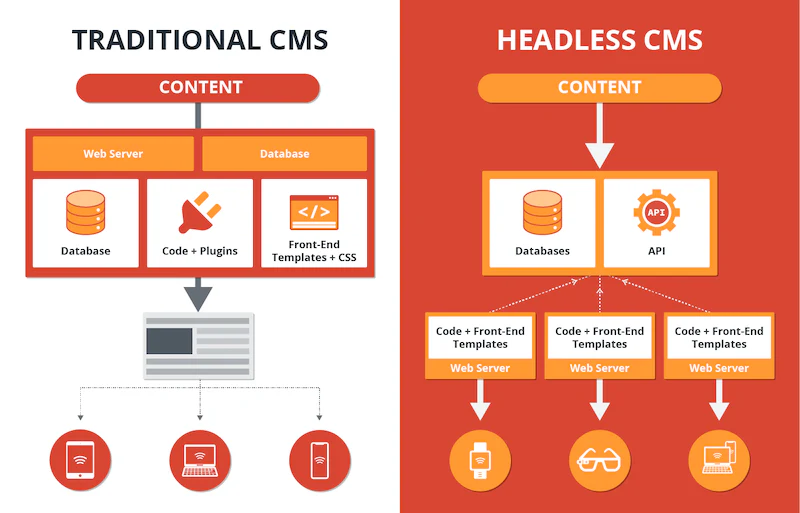
What are the benefits of a headless CMS?
By separating the content (body) from its presentation layer (head) and delivering data straight to devices via an API, a headless CMS allows developers to manage and update all their content in one place and push to any device, as well as easily repurpose assets across platforms.
On top of this, the separation allows for a smoother customer journey. Maintenance can be done on the backend whilst the frontend continues without interruption; the frontend can be scaled to handle traffic spikes around holidays or seasons without migrating content, and you can separate frontend and backend teams to work simultaneously, increasing the output of content.
Traditional vs Headless CMS
Traditional CMS
A traditional CMS is an all-in-one platform where the backend and frontend are connected. You may have heard of traditional CMS providers like WordPress, Drupal, and Shopify. This type of setup has certain advantages and disadvantages:
Benefits
- No coding required means non-technical users can operate it easily.
- Offers fast setup and deployment, making it ideal for small businesses.
- All-in-one setup makes editing and managing a lot easier.
- Thousands of extensions and plugins are available for major platforms like WordPress.
Disadvantages
- Content is tightly bound to a specific layout, so it’s hard to reuse assets or push them to different devices.
- Having everything connected can sometimes result in slower page speeds.
- Lack of customisation on the frontend.
- Traditional platforms have less security and are more vulnerable to breaches.
Headless CMS
A headless CMS separates the frontend from the backend of the website, with common vendors including Contentful, Sanity, Strapi, and Storyblok. Headless might be the right way to go for your business, but it’s worth considering the pros and cons to help inform your decision:
Benefits
- You can publish content once and display it across all devices.
- Lots of customisation and design freedom without being tied to templates.
- Allows for fast-loading pages since the content is not connected to the backend.
- This separation also increases security since the core database is out of reach of the frontend.
Disadvantages
- Requires building a user interface from scratch.
- Higher setup and development costs.
- Designing is much harder since there are no templates or easy built-in tools.
- Out-of-the-box, standard headless setups lack visual previews, requiring custom developer configuration or specific preview-friendly vendors (like Storyblok) to allow marketing teams to preview content before it goes live.
How to tell if a headless CMS is the right choice
Go with a traditional CMS if:
- You are purely web-focused: If your content only lives on a standard website and you have no immediate plans for mobile apps or digital products, a traditional CMS would work fine for you.
- You want simplicity and easy publishing: If you want to build, design, and launch landing pages without relying on a developer to write code, and you’re not too fussed with customisability, a traditional CMS works.
- You have a low budget or time restraints: If you want quick launches with pre-made templates and useful plug-ins, a traditional CMS would be perfect.
Go with a headless CMS if:
- You have an omnichannel strategy: If you only want to publish content once and have it update across your entire website, a mobile app, and any portal dashboards simultaneously, you’ll need a headless CMS.
- Your frontend demands are unique: If you require a very fast, highly customised, or deeply interactive user experience that a traditional CMS template can’t provide, then you should consider a headless CMS.
- You have dedicated engineering resources: If you have an in-house frontend development team (or a retained agency) ready to build and maintain that part of the site, then splitting your teams in two can be great for productivity.
| Feature / Capability | Traditional CMS | Headless CMS |
|---|---|---|
| Editing Experience | Easy page builders & templates with drag-and-drop features, inline editing, and instant visual previews. | Highly customisable but requires coding and specialist knowledge. |
| Content Distribution | A single channel, primarily built for websites. Pushing to mobile apps requires complex workarounds. | An omnichannel, with API delivery that can publish across websites, apps, and smart devices. |
| Developer Dependency | Low to Medium: You can change layouts, install plugins, and tweak themes independently. | High: Marketers write content, but any changes to the visual design or layout require a developer. |
| Website Performance & Speed | Variable: Heavy themes, databases, and unoptimised plugins can slow down page load speeds. | Excellent: Feeds into modern, lightweight frontend frameworks, yielding lightning-fast page loads. |
| SEO Tools | Simple plug-ins like Yoast manage meta tags, sitemaps, and redirects automatically. | Provides a lot more technical control, but your developers must program metadata and sitemaps manually. |
| Upkeep & Security | High Maintenance: Requires constant plugin, theme, and core security updates to prevent hacking. | Low Maintenance: The content backend is isolated from the public frontend, making it incredibly secure and stable. |
Common problems of a headless CMS for SEO
Whilst a headless CMS SEO strategy is a great idea, it can be a little tricky to pull off, and there may be some common pitfalls you fall into. Here are some things to look out for when creating your headless interface.
Check your JavaScript frameworks
Headless builds frequently rely on client-side rendering (CSR) via JavaScript frameworks. If this is handled poorly, search engine crawlers may initially see a blank HTML file, resulting in indexing blockages. To help with this, make sure to implement server-side rendering (SSR) or static site generation (SSG) to pre-render the content before the search engine reads it.
Learn more about JavaScript in our complete guide to JavaScript SEO.
Construct your API fields
Make sure to manually construct API fields for meta titles, descriptions, XML sitemaps, and canonical tags. Unlike a traditional CMS, you won’t have plugins like Yoast to help you.
Ensure structuring is logical
Make sure your URL slugs and redirects are structured logically so that your team and the user aren’t confused. Additionally, enabling your marketing teams to create 301 redirects within the headless interface without writing code is important if you want a seamless output without the constant help of tech specialists.
Organise your sitemaps
Programmatically generating dynamic XML sitemaps whenever a content model changes and storing them on the hosting platform helps keep your site organised and increases efficiency in the long run.
Mitigating risk in headless CMS site migrations
The migration to a headless CMS can involve some risk. Without a traditional CMS to automatically manage the site structure, vital SEO elements can easily break during the process.
To mitigate these risks and ensure a seamless transition, there are a few technical things you should consider:
- Metadata & Tag Parity: Ensure your custom API fields perfectly map and can transfer all meta titles, descriptions, canonical tags, and H1s from your old CMS to the new frontend.
- True 404 Status Codes: Verify that your JavaScript framework returns a genuine 404 Not Found server response header for broken links, rather than a soft 200 OK page.
- Automated Schema Injection: Configure structured data (like Product or Article schema) to render dynamically on the frontend via the API payload.
- Render Validation: Check your pre-rendering setup (SSR or SSG) using Google’s Rich Results Test to confirm crawlers see the full HTML content, not a blank JavaScript shell.
Need expert migration oversight? Head over to our site migrations service page to see how we can help you get to grips with your new CMS platform, whether it’s a headless CMS or a traditional one.
Establish an airtight SEO strategy with Impression
Whether you’re looking to switch to a headless CMS or you plan to stick with a traditional CMS, we can help you as an award-winning SEO agency. Our expert teams are trained in technical SEO and international SEO, as well as many other digital services.
Headless CMS FAQs
Does a headless CMS improve SEO?
It can, but at a cost. A headless CMS can improve SEO by optimising your site speeds and core web vitals, leading to a better user journey, but it requires complex technical frameworks that can take a lot of time and effort, even for trained technical specialists.
Should I use a headless CMS SEO strategy?
This depends on your business, your expertise, and the amount of effort you’re willing to put in. If you can effectively configure your own frontend, including the metadata via code, and are willing to do so, then a headless CMS is a great idea.
If you are a small business that requires more guidance and you benefit from templates and plugins, we recommend sticking with a traditional CMS.
Is headless SEO harder than traditional SEO?
Headless SEO is harder initially because it relies less on automated plugins and demands complex technical elements, as well as good collaboration between SEO strategists and web developers to build an effective web page.