The structure of web traffic is undergoing a fundamental structural transition.
We’re certainly seeing the impacts of these changes en masse. Whilst SEO visibility is driving, in part, Generative Engine Optimisation (“GEO”) visibility, clicks in traditional SEO rankings are harder to come by, and customer behaviour is fragmented as users are using new places to find answers, namely AI modes and LLM chat interfaces.
Bot traffic has always been persistent, but it is reaching new highs, and, due to its sophistication, it’s showing up more frequently and feeling like a new issue all over again:
- AI Overviews appear in up to 30% of all Google search queries, up from ~13% in early 2025 (SE Ranking).
- When an AI Overview appears on a search page, organic click-through rates for the top-ranking page drop up to 58% (Ahrefs).
- Around 93% of dedicated AI search sessions (conversational interfaces) end without a click-through to an external web page (Semrush).
- Nearly 60% of web traffic is driven by bots (Cloudflare Radar)
- Generative AI referral traffic to online retail sites grew 138% year-over-year (Adobe Analytics)
- AI referral traffic accounts for 1.08% of all website traffic (Conductor)
With Agentic browsing on the rise and here to stay, it is a clear sign of the future direction of travel; bot browser sessions can replace some human ones.
Marketing leadership has focused heavily on GEO visibility to ensure brand visibility within Large Language Model (“LLM”) ‘answers’. However, GEO only solves the “read side” of the consumer journey.
When an autonomous agent attempts to complete an action on behalf of a user (such as calculating custom SaaS pricing, checking inventory, or submitting a qualified enterprise lead form), it must navigate the challenges of web page rendering and scraping. Certainly easily passable for reading text but far more brittle when navigating form structures and other interaction requirements.
Web Model Context Protocol (“WebMCP”) addresses this challenge. Backed by Google, Microsoft, and web standards bodies, WebMCP is an emerging browser standard that lets websites give AI assistants direct, structured access to their online features.
- 💡 Key points for technical marketers
- What is WebMCP and how does it work?
- 1. The Declarative Model
- 2. The Imperative Model
- WebMCP vs. Schema.org vs. Server-Side MCP
- Strategic channel considerations
- 1. Organic visibility
- 2. Paid Media
- 3. Web Analytics and Measurement
- Evaluating benefits and tradeoffs
- Strategic benefits
- Strategic tradeoffs & risks
- Preserving UX and Digital Experience
- Bridging WebMCP to Universal Commerce Protocol (UCP)
- The Future of WebMCP in the Tech Stack
- Frequently Asked Questions (FAQs)
- What is the primary technical difference between WebMCP and standard MCP?
- How does WebMCP impact user privacy and regulatory compliance (GDPR/CCPA)?
- Can WebMCP be implemented without deploying new backend infrastructure?
- How do we prevent malicious agents from abusing WebMCP endpoints?
- What is the estimated timeline for implementing a basic WebMCP pilot?

💡 Key points for technical marketers
- GA4 tracking breaks on agent executions, requiring custom event dispatchers piped directly into your CDP.
- Google PageSpeed Insights now evaluates 4 agentic metrics, shifting organic search optimisation to ‘Agentic Actionability’.
- Paid ads can bypass landing pages by using WebMCP to generate direct-to-checkout links with pre-embedded tracking parameters.
- Zero back-end deployment is required as WebMCP executes client-side using simple HTML annotations or JavaScript wrappers.
- WebMCP tools must connect to your martech stack, storing definitions in design systems whilst piping live execution data into your CRM.
What is WebMCP and how does it work?
WebMCP brings the core principles of the Model Context Protocol (“MCP”), an open standard that lets AI applications safely connect to external data sources and tools, directly into the user’s web browser. Rather than requiring an agent to parse complex visual layouts or execute computer-vision click actions, WebMCP allows web apps to give AI assistants a built-in control panel, enabling the AI to perform specific tasks on the site automatically.
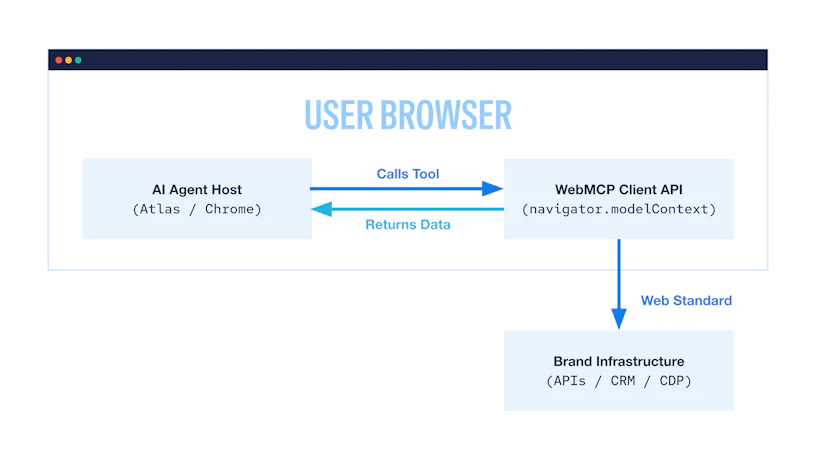
When it comes to adding WebMCP to a site, you’ll typically take one of two approaches:
1. The Declarative Model
The declarative approach allows marketing and engineering teams to enhance existing web forms with standardised semantic attributes. By adding structured metadata directly to standard web page fields, your web application signals to the browser’s agent engine that an existing form accepts structured data inputs directly.
This model requires minimal engineering overhead because it leverages existing frontend form submissions. When an agent visits the page, it reads the form attributes, identifies the required parameters (such as company size or work email), and populates the request without simulating visual keyboard or mouse actions.
2. The Imperative Model
The imperative approach is designed for dynamic interactive workflows, such as real-time pricing configurators, eligibility checkers, or multi-tiered subscription estimators. Rather than relying on simple static forms, developers expose client-side JavaScript tools directly to the browser context engine.
When an AI agent queries the web page, the browser presents a structured list of available actions along with definitions of required parameters and data types. Instead of forcing users to navigate forms and menus, the AI works behind the scenes in real time to retrieve custom pricing, apply discounts, and generate direct links.
WebMCP vs. Schema.org vs. Server-Side MCP
Understanding where WebMCP sits within your architecture requires evaluating it alongside existing structured data paradigms and backend integration protocols.
| Capability / Attribute | Schema.org Structured Data | Server-Side MCP | WebMCP (Client-Side) |
|---|---|---|---|
| Primary Purpose | Descriptive indexing and semantic metadata parsing | Direct server-to-server tool invocation and raw data retrieval | Interactive, browser-level tool execution during active user web sessions |
| Execution Layer | Passive markup parsed by search crawlers | Server-side APIs requiring backend infrastructure deployment | Client-side JavaScript DOM/Browser Context (navigator.modelContext). |
| Primary Persona | SEO Specialists & Indexers | Backend Data Engineers & Solutions Architects | Frontend Web Developers & Digital Growth Marketers |
| Marketing Function | Improves search eligibility, rich snippets, and GEO citation | Power backend AI agent workflows and headless pipeline queries | Enables direct lead conversion, quote generation, and interactive workflows |
| User Context | Offline / Async Crawling | Direct API-to-API calls outside browser session state | Live, human-in-the-loop web browsing session with active local cookies/state |
Strategic channel considerations
WebMCP challenges traditional ideas about how we attract customers and measure success online. We’re making a few educated predictions here, but it’s a grounded look at where things are going.
1. Organic visibility
Traditional SEO focuses on visibility and page indexability, while GEO focuses on citation rates inside generative answers. WebMCP introduces a third layer: Agentic Actionability.
- Ranking high in an AI search result is insufficient if a competitor’s site allows the user’s agent to complete a transaction directly from their chat interface. WebMCP is the technology that makes your conversion funnels transactional for agents.
- Technical SEO teams must maintain alignment between human-readable page copy and WebMCP tool descriptions. Misleading parameter descriptions may lead to hallucinated inputs or direct failure in agent validation passes.
- Google has recently included agentic browsing scoring in Lighthouse, so this is now reflected in PageSpeed Insights. It currently consists of four metrics, with WebMCP being ‘hidden’:
- Accessibility tree – A well-formed accessibility tree helps AI agents navigate and interact with the page. Having your forms marked up with clear labels helps agents know what they are for.
- Cumulative layout shift – This is an older metric from Core Web Vitals that measures the movement of visible elements within the viewport. It makes sense that this is measured, as agents don’t want to see a page moving around a lot when they are trying to understand it while it loads.
- LLMs.txt – Checks whether or not the site has an llms.txt file and if it follows the standards.
- WebMCP – This metric is currently hidden as it’s still proposed, but it’s very common for these to eventually be fully integrated into the tool.
With WebMCP being part of this scoring system, it’s clear that it’s something SEO teams will need to focus on as the shift to agentic browsing occurs. We’re no longer just optimising for a crawler, but also for these agents which will be accessing the site.
2. Paid Media
Paid media strategies must adapt to traffic driven by automated agents operating on behalf of high-intent buyers.
- Ad platforms will still most likely be built for human consumption and choice; however, post-click experiences may begin to look very different over time. We’d also expect to see potentially some labelling or preferences of ads/websites which support agentic browsing or capabilities in some ad experiences.
- Instead of bidding purely on top-of-funnel keywords to drive ad clicks to landing pages, performance teams can have WebMCP generate links that send users straight to checkout, while automatically embedding tracking parameters right into the link.
3. Web Analytics and Measurement
As WebMCP adoption grows, it disrupts traditional tracking setups in major tools like Google Analytics 4 (GA4) and Adobe Analytics.
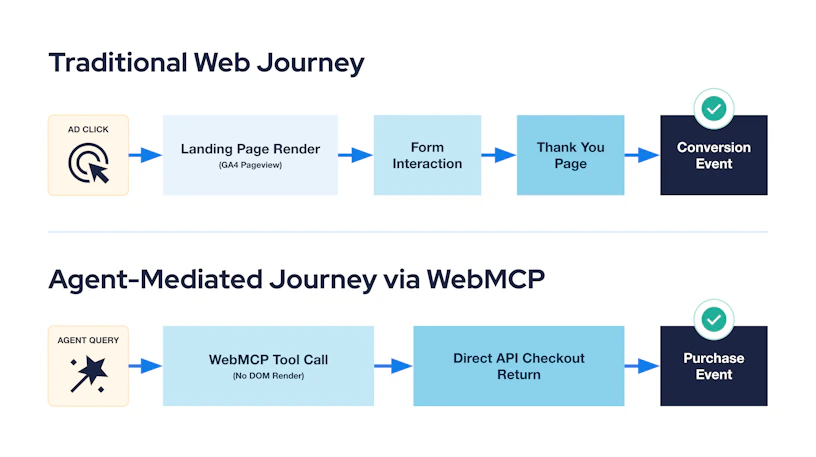
- When an agent interacts with a page via WebMCP APIs, it may not trigger standard Document Object Model (“DOM”) interaction events or route navigation triggers. Traditional pageview-based session tracking underestimates user intent and volume.
- Data engineering teams can (and should!) attach custom event dispatchers inside WebMCP tool execution handlers. Every tool call must explicitly log execution metrics, parameter validation status, and completion states directly into your Customer Data Platform (“CDP”). This may also give technical marketers flashbacks to ‘measurement protocol’ style measurement, too.
- Attribution models really should distinguish between human-executed conversions and agent-assisted transactions. Without proper event tagging, Return on Ad Spend (“ROAS”) calculation models risk misallocating credit to organic channels when an agent leverages WebMCP tools during a paid campaign interaction, and therefore ongoing optimisation will become more confused.
Evaluating benefits and tradeoffs
While WebMCP offers significant operational advantages for progressive, technical marketing teams, implementation carries distinct operational and brand tradeoffs.
Strategic benefits
- By eliminating multi-step form fills and manual UI navigation, WebMCP reduces friction in high-intent sales funnels, potentially resulting in lower conversion drop-off.
- Structured tool definitions strictly enforce parameter data types (such as validated email formats or numeric range bounds), eliminating unstructured input errors and friction commonly experienced in traditional lead forms.
- Early adopters establish structural presence inside emerging AI browsers/surfaces, ensuring their products are recommended and actionable before competitors adapt.
Strategic tradeoffs & risks
- Bypassing standard web pages reduces user exposure to rich visual branding, promotional banners, product messaging, and cross-sell design patterns. This also may skip or dilute some of the effects of your digital experience investments if not considered thoroughly.
- As of July 2026, WebMCP support is largely concentrated in Chromium-based implementations via origin trials. Safari (WebKit) and Firefox (Gecko) exhibit varying adoption timelines, requiring fallbacks to standard progressive enhancement patterns.
- Giving AI assistants direct access to your site’s internal tools opens up incredible possibilities, and a few serious security headaches. When you expose site capabilities to an automated agent, you’re also handing bad actors a potential new backdoor. Without strict guardrails, malicious users can trick the AI into leaking sensitive customer data or running commands behind the scenes. Engineering teams need to rigorously stress-test these integrations before pushing them live. But because this technology feels so easy to “plug and play,” many brands will be tempted to rush it out. Mark my words: it’s only a matter of time before we start seeing news headlines about companies learning this lesson the hard way.
Preserving UX and Digital Experience
Transitioning to an agent-ready web architecture requires balancing conversion efficiency with long-term brand equity building.
In a world of agentic browsing, we must adopt an ‘Intentional Friction’ model. Just as a physical store uses layouts to guide a shopper, your WebMCP implementation should intentionally introduce ‘friction moments’, places where the agent hands the transaction back to the human to allow for emotional engagement, brand education, or upselling.
We don’t necessarily expect all product types to attract consumers who want to buy entirely agentically, so this really does push Agentic/LLM experiences back towards discovery and research-only (which is arguably where we are already at). But for smaller purchase values, over-indexing on frictionless, machine-mediated transactions risks commoditising your offering if buyers never experience your brand narrative.
To maintain brand experience and equity when designing WebMCP interactions, implement these three operational guidelines:
- When returning data structures from an imperative tool call, include key brand differentiators alongside raw numbers. For instance, return structured parameters for value proposition summaries or support tier details alongside baseline pricing metrics.
- Do not push the entire buyer journey into headlessly executed agent scripts. Force a visual browser handoff for high-value agreement steps, bringing the user back into your core web experience for contract finalisation or custom onboarding displays.
- Ensure that system prompts, tool description parameters, and fallback error strings match your corporate tone of voice guidelines, avoiding overly sterile technical jargon when returning messages to user-facing agents.
WebMCP allows you to provide just enough information for an agent to make a decision, while holding back the complex brand story for the landing page, ensuring the full web experience can still be maintained in part, and users still experience the full customer offer.
Bridging WebMCP to Universal Commerce Protocol (UCP)
While WebMCP operates at the browser layer to manage interactive tool calls within a live web session, it does not handle standard payment rails, cross-merchant identity negotiation, or global inventory synchronisation.
This is where the Universal Commerce Protocol (“UCP”) becomes relevant.
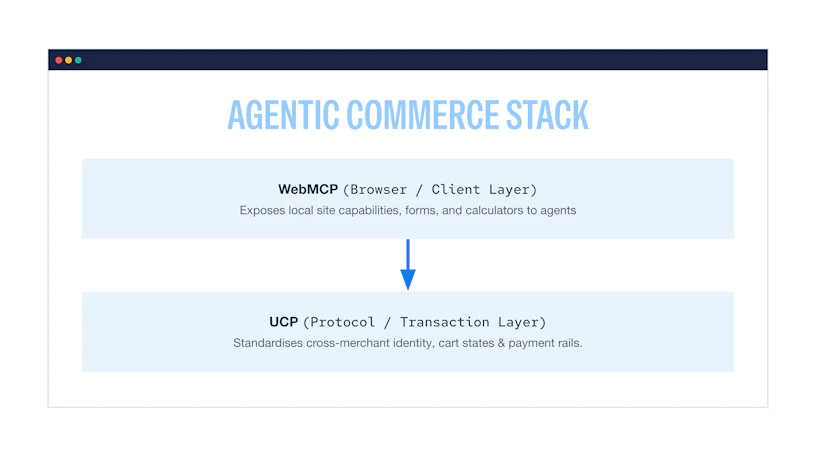
To build a complete AI commerce strategy, you need two pieces working in tandem: WebMCP and UCP.
Where WebMCP acts as the client-side bridge, letting an AI agent talk directly to your site in the browser, UCP provides the standardised transaction language behind the scenes. The ultimate setup combines both: WebMCP handles the front-end experience on your site, then passes secure transaction data downstream to finish the sale on a UCP-compliant checkout system.
The Future of WebMCP in the Tech Stack
As WebMCP moves from preview trials toward full W3C web standard status, technical marketing leaders must incorporate agent-readiness into their core martech roadmaps.
Integrating WebMCP into enterprise martech requires aligning client-side execution with core data orchestration workflows:
- Maintain WebMCP tool definitions inside your design system repository alongside your UI component library, ensuring updates to business logic are deployed consistently across web properties.
- Pipeline every executed WebMCP tool call directly into your CDP (such as Bloomreach, Segment, Tealium, Klaviyo or Treasure Data) to enrich customer profiles with intent signals captured during agent interactions.
- Connect lead generation tools directly to enterprise CRM engines (such as Salesforce or HubSpot) to enable real-time sales team notification and automated email nurture activation.
Frequently Asked Questions (FAQs)
What is the primary technical difference between WebMCP and standard MCP?
Model Context Protocol (“MCP”) is primarily a server-side framework designed to connect backend databases and cloud APIs to LLM services. WebMCP is a client-side web standard implemented in the browser, allowing live web pages to expose tools directly to browser-based AI agents while leveraging active user session cookies and local DOM state.
How does WebMCP impact user privacy and regulatory compliance (GDPR/CCPA)?
WebMCP executes within the user’s browser sandbox, adhering to standard web security boundaries. Tools registered via WebMCP only expose the data and actions explicitly defined by the site developer. However, collecting personal data through agent tool inputs still requires explicit consent mechanisms, transparent privacy disclosures, and proper data processing agreements under regulations such as the General Data Protection Regulation (“GDPR”).
Can WebMCP be implemented without deploying new backend infrastructure?
Yes. Using the Declarative API pattern, engineering teams can annotate existing HTML forms with simple semantic attributes in minutes. For the Imperative API pattern, JavaScript handlers can wrap existing client-side API calls, allowing organisations to deploy WebMCP capabilities over their current backend architecture.
How do we prevent malicious agents from abusing WebMCP endpoints?
WebMCP implementations must incorporate standard security practices, including client-side rate limiting, input parameter validation against strict JSON schemas, and backend authentication tokens. Engineering teams should conduct red-teaming passes to verify that tool descriptions cannot be manipulated through prompt injection attacks.
What is the estimated timeline for implementing a basic WebMCP pilot?
A typical initial pilot (covering an action inventory audit, schema design, and registering two to three core tools, e.g., pricing calculator and enterprise contact form) might take between two and four weeks of combined frontend engineering and technical martech effort.